
Navigation
- FAQ Home
- All categories
- SiteWizard Editor

- Ecommerce
- Domains
- Legacy Support
- SEO
- Useful Contact Details
- Miscellaneous
- Instant Response
- Sitemap
Search
Email » Setting Up
ID #1066
Email accounts in Opera
Step 1
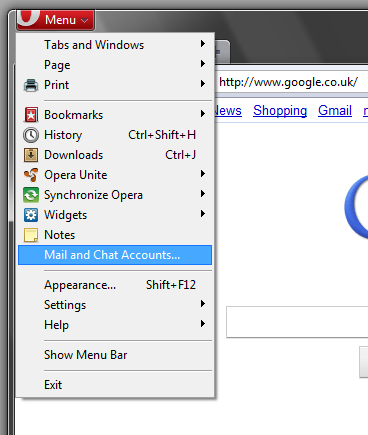
Click on the Opera button in the top left and then select Mail And Chat Accounts.
Step 2
Then click Yes.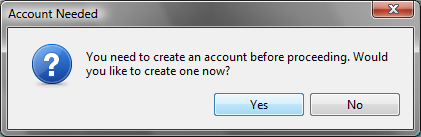
Step 3
Select Email and then click next.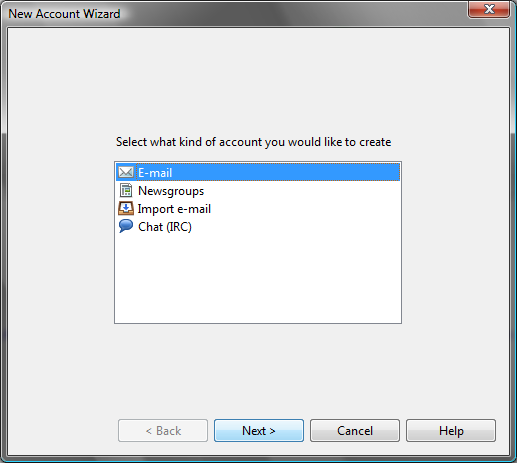
Step 4
Enter your name in the Real Name box, then the email address that you are setting up in the E-mail Address box and then your company name into the Organisation box. Now click next.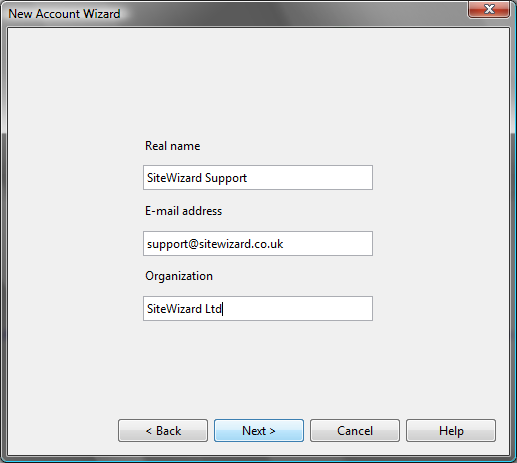
Step 5
Enter your email address into the Login name box and the password for the email account that we emailed to you in the Password box. Then click next.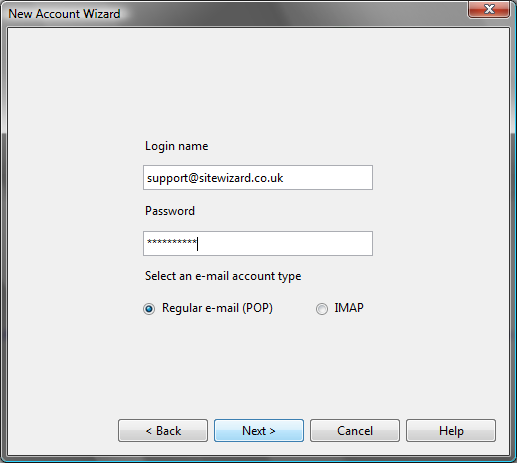
Step 6
Make sure that the Incoming and Outgoing servers are set to the ones that we emailed to you. Then click Finish.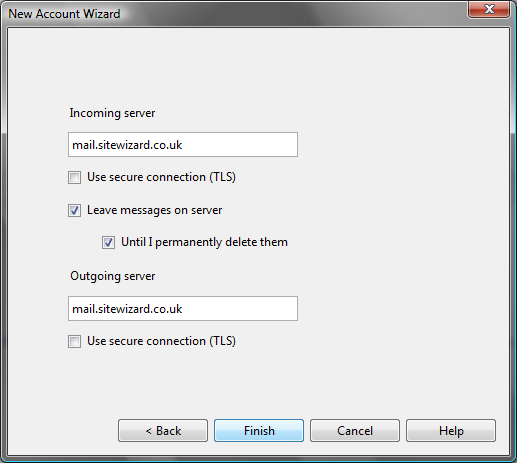
Tags: Email accounts in Opera
Related entries:
- How to set up email accounts in Outlook 2000.
- How to set up email accounts in Outlook 2003.
- How to set up email accounts in Eudora
- How to set up email accounts in Incredimail
- How to set up email accounts in Mac Mail
Last update: 2010-07-02 12:03
Author: SiteWizard Support
Revision: 1.3


You cannot comment on this entry
Tags
Hover here for Tags
bounce backs Email Accounts In Outlook 2000 emails common questions thunderbird pop Email Accounts In Entourage 2004 Legacy incredimail ecommerce payment gateways problems receiving email mac os x Legacy Shopping Cart sitewizard editor File Store ecommerce tools adding email account mac Thumbnail Viewer Legacy eudora videos Legacy mac mail paste from word Google Optimisation problems sending email ecommerce common questions Legacy opera Allow Pop-Ups Within Internet Explorer Resizing Images emails Disable the Google Pop-Up Blocker links outlook 2003 sitewizard editor menu old editor sitewizard editor Image Store Legacy Emails email set up in outlook 2010 beta IncrediMail Outgoing SMTP Server Limitations Legacy SEO Email accounts in Opera gallery Disable the Mcafee Pop-Up Blocker website under construction ecommerce file store window live transfer Disable the Yahoo Pop-Up Blocker sitewizard editor anchor links site not showing up
Email :
SiteWizard Editor :
Ecommerce :
Domains :
Advanced Search :
Latest FAQs :
:
Our Terms :
phpMyFAQ
SiteWizard : Lyndean House : 30-34 Albion Place : Maidstone : Kent : ME14 5DZ Tel No.08450 60 88 60 : Fax No.08450 60 88 61
© 1996- www.SiteWizard.co.uk - SiteWizard is a Registered Trademark (Patent Pending)
Company Registration Number 03454062. Registered in England. VAT Number 683830804.
© 1996- www.SiteWizard.co.uk - SiteWizard is a Registered Trademark (Patent Pending)
Company Registration Number 03454062. Registered in England. VAT Number 683830804.